
CAC (Premium)
Provides information on how to verify a business using its RC/BN/IT number.
CAC (Premium)
The CAC (Premium) endpoint enables customers to verify a business using its RC, BN, or IT Number through the Corporate Affairs Commission (CAC).
This advanced endpoint returns comprehensive details about the business, including director information, shareholder structure, registered address, and other critical data required for reliable business verification in Nigeria.
It delivers a deeper, more complete dataset than standard CAC lookups, helping businesses perform enhanced due diligence and maintain compliance.
Use Case
Advanced CAC verification can be used as a business identity validation tool to onboard organizations quickly and securely.
Customers can confirm the legitimacy and registration details of any business by providing its RC, BN, or IT number.
{{baseUrl}}/v1/ng/identities/cac-premiumRequest Body
| Parameters | Type | Description |
|---|---|---|
| regNumber (REQUIRED) | string | Registered Company Number (RC, BN and IT) |
This endpoint will return registration details captured for the business. To conduct a test
Response Sample
{
    "id": 1**5,
    "summary": {
        "cac_check": "verified"
    },
    "status": {
        "state": "complete",
        "status": "verified"
    },
     "cac": {
         "rcNumber": 11000011,
         "companyName": "Test Company",
         "companyType": "PRIVATE_COMPANY_LIMITED_BY_SHARES",
         "registrationDate": "2017-04-17T13:33:22.770+00:00",
         "branchAddress": "Test Company Address",
         "companyEmail": "[email protected]",
         "city": "oshodi",
         "classification": "Company | Business | Trustee",
         "headOfficeAddress": "Test Company Head Office Address",
         "lga": "oshodi",
         "affiliates": 2,
         "shareCapital": "1000000",
         "shareCapitalInWords": "ONE MILLION NAIRA ONLY",
         "state": "Lagos",
         "status": "ACTIVE | INACTIVE"
          "surname": "OGWUCHE",
          "firstname": "EMMANUEL",
          "otherName": "OMOCHE",
          "email": "[email protected]",
          "phoneNumber": "2348036018814",
          "gender": "MALE",
          "formerNationality": null,
          "city": "ABUJA",
          "occupation": "LEGAL PRACTITIONER",
          "formerName": null,
          "corporationName": null,
          "rcNumber": null,
          "state: "FCT",
          "formType": "Driver's License",
          "numSharesAlloted": null,
          "typeOfShares": null,
          "dateOfBirth": "1980-04-17T23:00:00.000+00:00",
          "dateOfAppointment": "2022-08-08T11:12:51.383+00:00",
          "status": "ACTIVE",
          "formerSurname": null,
          "formerFirstName": null,
          "formerOtherName": null,
          "identityNumber": "ABC62960AA01",
          "otherDirectorshipDetails": null,
          "lga": "785",
          "isCorporate": false,
          "nationality": "NIGERIA",
          "address": "Trinity House Plot 943, Cadastral Zone B06",
          "streetNumber": "Suite 037, First Floor",
          "isChairman": null,
          "isDesignated": null,
          "postcode": "",
          "formerNameType": null,
			affiliateTypeFk(affilliateType): {
           "name": "PRESENTER",

            },
      "countryFk"(affiliateCountry): {
      		"name": "NIGERIA",

            },
      "affiliatesResidentialAddress": {
          "country": "NIGERIA",
          "state": "FCT",
          "lga": "785",
          "city": "ABUJA",
          "address": "Trinity House Plot 943, Cadastral Zone B06",
          "streetNumber": "Suite 037, First Floor",
          "postcode": "",
          "hideResidentialAddress": false,
          "affiliateType": null
            },
      affiliatesPscInformation: {
        "taxResidencyOrJurisdiction": "NIGERIA",
        "legalForm": null,
        "register": "Corporate Affairs Commission",
        "governingLaw": "CAMA",
        "dateOfPsc": "2022-08-05",
        "pscHoldsSharesOrInterest": true,
        "pscHoldsSharesOrInterestPercentageHeldDirectly": 100.0,
        "pscHoldsSharesOrInterestPercentageHeldIndirectly": 0.0,
        "pscVotingRights": true,
        "pscVotingRightsPercentageHeldDirectly": 100.0,
        "pscVotingRightsPercentageHeldIndirectly": 0.0,
        "pscRightToAppoints": false,
        "pscSignificantInfluence": false,
        "pscExeriseSignificantInfluence": false
    }
}
How to integrate CAC(Premium) in a Collection
Collection1️⃣ Sign up and Log in to QoreID
2️⃣ Create a Collection
3️⃣ Select "Business Identity"
4️⃣ Subscribe to CAC Premium
5️⃣ Proceed to integrateTo test the CAC(Premium) endpoint. Click here
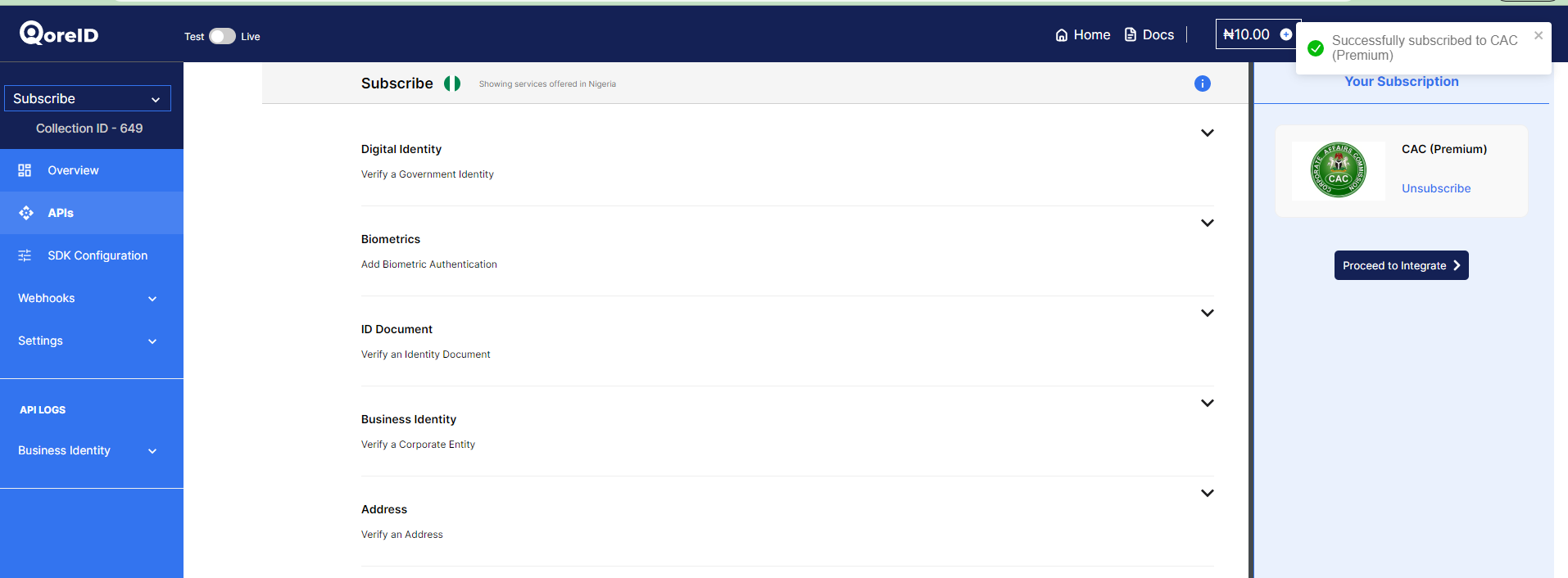
Subscribing to CAC(Premium) in a Collection
How to integrate CAC(Premium) in a Workflow
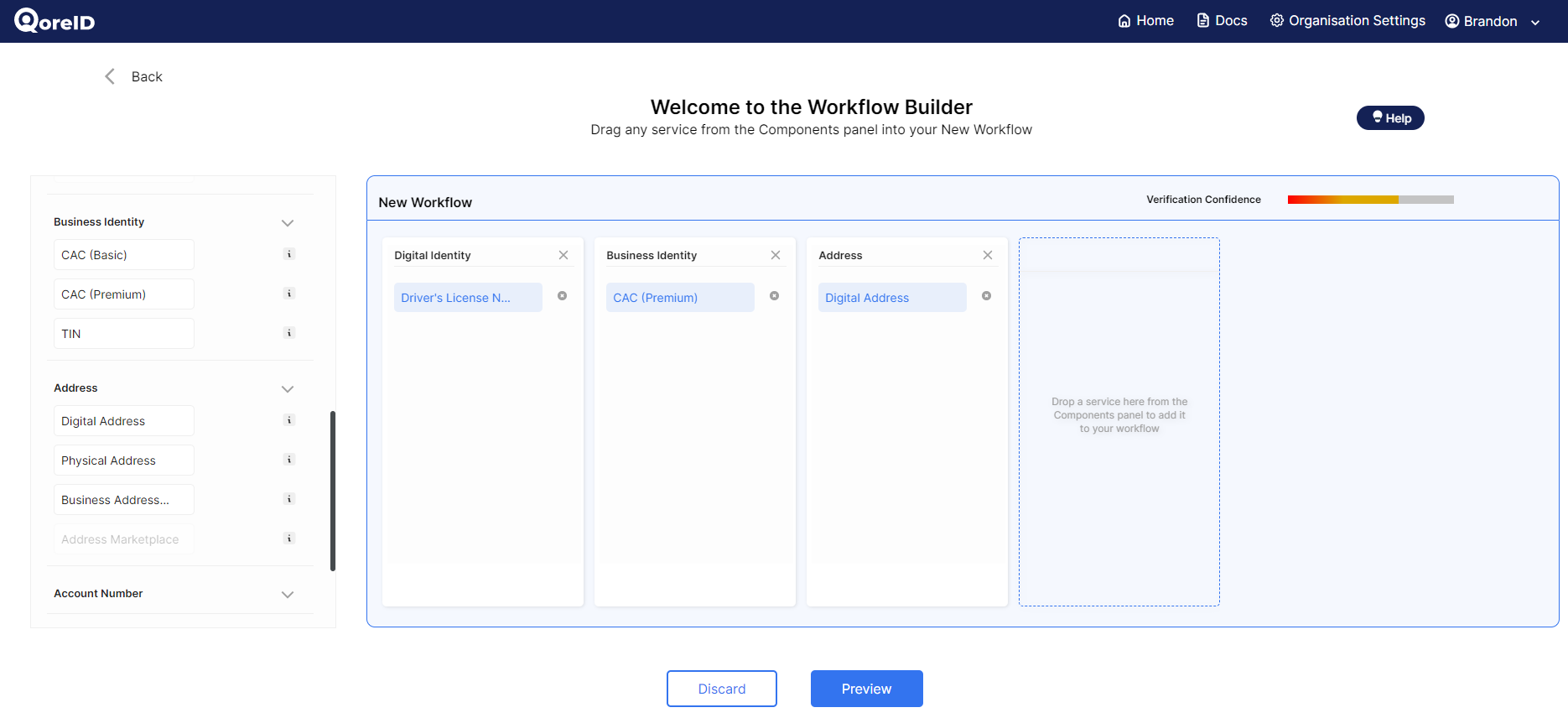
Adding CAC(premium) to your Workflow
WorkflowCAC (Premium) can also be integrated as part of a workflow..
1️⃣ Log in to QoreID
2️⃣ Create a Workflow using either Setup wizard or Workflow Editor.
3️⃣ Select "Business Identity"
4️⃣ Add "CAC Premium" to your workflow
5️⃣ Proceed to integrateTo test the CAC(Premium) endpoint. Click here
Updated 10 months ago