
QoreID Flutter SDK
Important NoticeQoreID Flutter SDK automatically fetches the latest iOS and Android dependencies upstream. This means, those on version < v2.x.x will encounter issues with the new
sessionTokenSDK initialisation.
To continue usingclientId(v1.x.x) based initilisationPin the dependencies:
in
android:<project>/android/build.gradleadd the followingsubprojects { configurations.all { resolutionStrategy { force("com.qoreid:qoreid-sdk:1.4.6") } } }in
ios:<project>/ios/Podfileadd the following to your targettarget 'MyApp' do # Fixed Dependencies for clientId support. # It is recommended you migrate to v2, automativally fetched from upstream. + pod 'QoreIDSDK', '1.1.5' + pod 'QoreIDSDKDependencies', '1.0.7' end ...
NoteWith v1.1.3, you can now perform all Collection services including VeriFind (digital address verification), Passport, Driver’s License, and other QoreID services on both Android and iOS.
Installation
flutter pub add qoreidsdkdart pub add qoreidsdkImportant
Before runningpod install, comment outuse_frameworks!in yourios/Podfileif present:# use_frameworks! # ← Comment this line
Then install pods:
cd ios
pod install
Note
You must rebuild your app after installation:flutter clean && flutter pub get && flutter run
Android Setup
1. Add QoreID Maven Repository
In android/build.gradle (inside repositories block):
repositories {
    google()
    mavenCentral()
    maven { url "https://repo.qoreid.com/repository/maven-releases/" }
    maven { url 'https://jitpack.io' }
}
2. ProGuard Rules (for release builds)
Create or update android/app/proguard-rules.pro:
-keep class com.qoreid.sdk.** { *; }
-dontobfuscate
Then reference it in android/app/build.gradle:
buildTypes {
    release {
        minifyEnabled true
        proguardFiles getDefaultProguardFile('proguard-android-optimize.txt'), 'proguard-rules.pro'
    }
}
3. Initialise in MainActivity
Kotlin (MainActivity.kt):
import com.qoreid.qoreidsdk.QoreidsdkPlugin

override fun onCreate(savedInstanceState: Bundle?) {
    super.onCreate(savedInstanceState)
    QoreidsdkPlugin.initialize(this)
}
import com.qoreid.qoreidsdk.QoreidsdkPlugin;
@Override
protected void onCreate(Bundle savedInstanceState) {
super.onCreate(savedInstanceState);
QoreidsdkPlugin.initialize(this);
}4. Permissions (VeriFind)
Add to android/app/src/main/AndroidManifest.xml:
<uses-permission android:name="android.permission.ACTIVITY_RECOGNITION" />
<uses-permission android:name="android.permission.ACCESS_COARSE_LOCATION" />
<uses-permission android:name="android.permission.ACCESS_FINE_LOCATION" />
<uses-permission android:name="android.permission.ACCESS_BACKGROUND_LOCATION" />
See full permission list: https://docs.qoreid.com/docs/permissions
iOS Setup
1. Wrap Root View in UINavigationController
Update ios/Runner/AppDelegate.swift:
import UIKit
import Flutter

@UIApplicationMain
@objc class AppDelegate: FlutterAppDelegate {
    var navigationController: UINavigationController!

    override func application(
        _ application: UIApplication,
        didFinishLaunchingWithOptions launchOptions: [UIApplication.LaunchOptionsKey: Any]?
    ) -> Bool {
        let controller = window?.rootViewController as! FlutterViewController

        GeneratedPluginRegistrant.register(with: self)

        navigationController = UINavigationController(rootViewController: controller)
        navigationController.setNavigationBarHidden(true, animated: false)

        window = UIWindow(frame: UIScreen.main.bounds)
        window.rootViewController = navigationController
        window.makeKeyAndVisible()

        return super.application(application, didFinishLaunchingWithOptions: launchOptions)
    }
}
2. Add Privacy Descriptions
In ios/Runner/Info.plist:
<key>NSCameraUsageDescription</key>
<string>We need camera access to capture documents and selfies.</string>
<key>NSPhotoLibraryUsageDescription</key>
<string>We need photo library access to let you upload documents.</string>
For VeriFind 4D (Location + Motion)
<key>NSMotionUsageDescription</key>
<string>Required for accurate address verification using device motion.</string>
<key>NSLocationWhenInUseUsageDescription</key>
<string>Required for address verification services.</string>
<key>NSLocationAlwaysAndWhenInUseUsageDescription</key>
<string>Required for background location during address verification.</string>

<!-- You also need to indicate that your app supports background location updates -->
<key>UIBackgroundModes</key>
<array>
    <string>location</string>
</array>
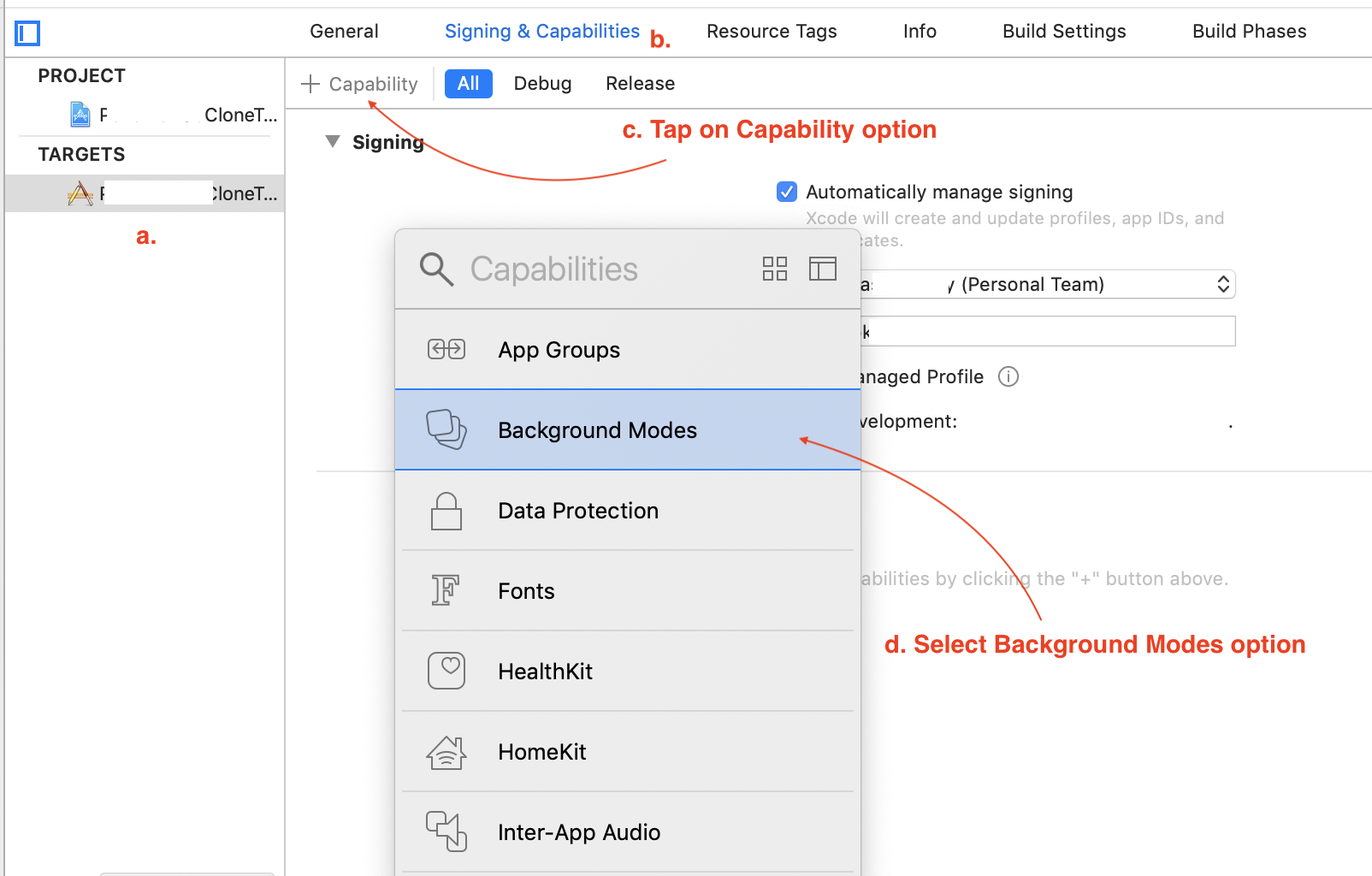
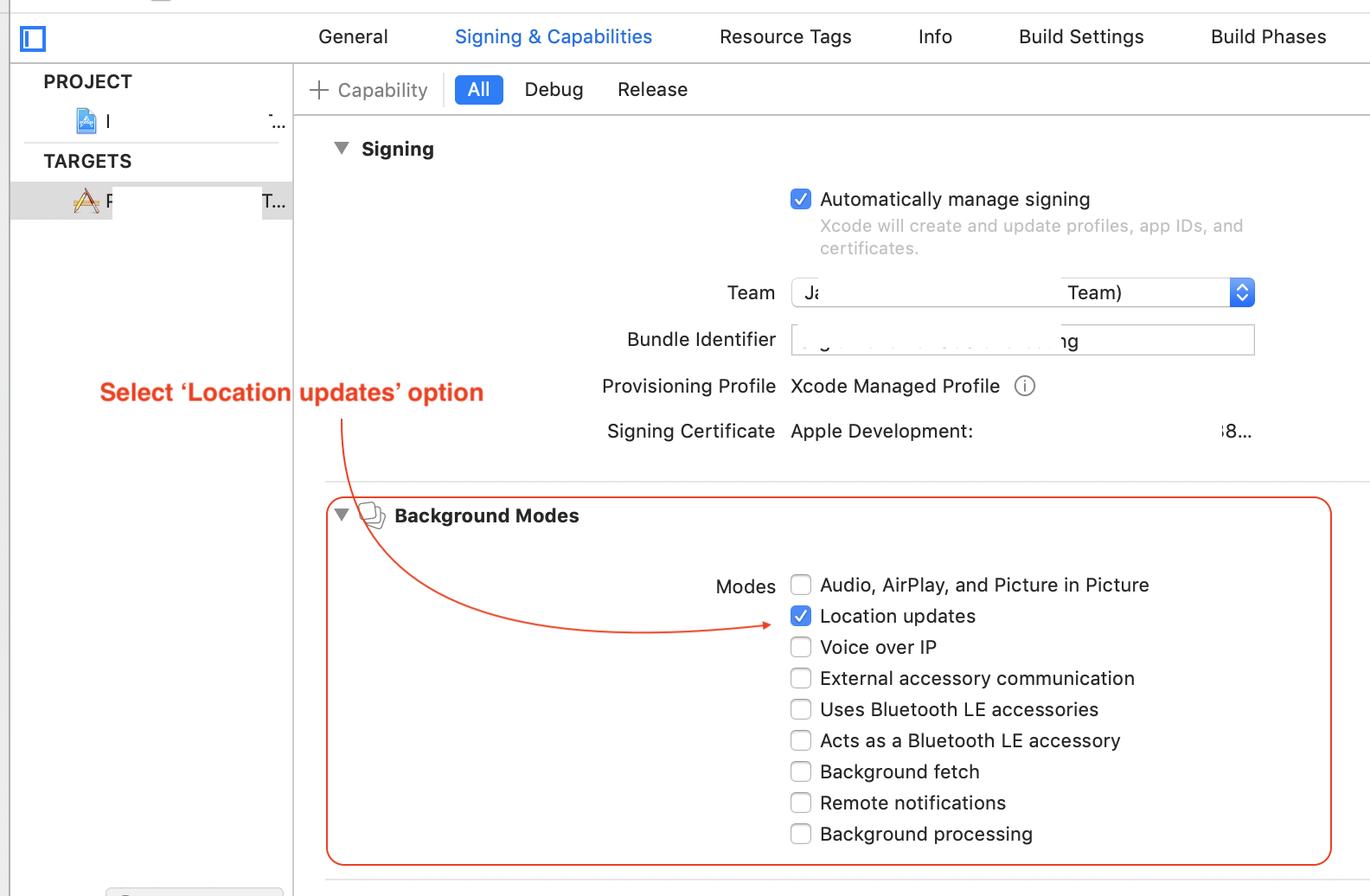
Also enable Background Modes → Location updates in Xcode project settings.
3. If using use_frameworks! (Podfile)
use_frameworks! (Podfile)Add this workaround to support static frameworks:
target 'MyApp' do
  # Fixed Dependencies for clientId support.
  # It is recommended you migrate to v2, automativally fetched from upstream.
+ pod 'QoreIDSDK', '1.1.5'
+ pod 'QoreIDSDKDependencies', '1.0.7'

end

$static_framework = ['qoreidsdk']

pre_install do |installer|
  Pod::Installer::Xcode::TargetValidator.send(:define_method, :verify_no_static_framework_transitive_dependencies) {}
  installer.pod_targets.each do |pod|
    if $static_framework.include?(pod.name)
      def pod.build_type
        Pod::BuildType.static_library
      end
    end
  end
end
Usage Example
import 'package:flutter/material.dart';
import 'package:qoreidsdk/qoreidsdk.dart';

void main() => runApp(const MyApp());

class MyApp extends StatelessWidget {
  const MyApp({super.key});
  @override
  Widget build(BuildContext context) {
    return MaterialApp(
      home: const HomePage(),
      theme: ThemeData(useMaterial3: true),
    );
  }
}

class HomePage extends StatefulWidget {
  const HomePage({super.key});
  @override
  State<HomePage> createState() => _HomePageState();
}

class _HomePageState extends State<HomePage> {
  @override
  void initState() {
    super.initState();
    _listenToResults();
  }

  void _listenToResults() {
    Qoreidsdk.onResult((result) {
      print('QoreID Result: $result');

      if (result['data']?['verification'] != null) {
        final verificationId = result['data']['verification']['id'];
        print('Verification ID: $verificationId');
      }
    });
  }

  void _launchQoreID() async {
    final data = QoreidData(
      clientId: "your-client-id",
      customerReference: "cust_12345",
      productCode: "face_verification", // or "verifind_4d", "passport", etc.
      flowId: 0,
      addressData: {},
      applicantData: {},
      ocrAcceptedDocuments: "",
      identityData: {},
    );

    await Qoreidsdk.launchQoreid(data);
  }

  @override
  Widget build(BuildContext context) {
    return Scaffold(
      appBar: AppBar(title: const Text('QoreID SDK Demo')),
      body: Center(
        child: ElevatedButton(
          onPressed: _launchQoreID,
          child: const Text('Launch QoreID Verification'),
        ),
      ),
    );
  }
}
Known Issue: Xcode 15 + Local Podspec Error
If you see:
Errno::ENOENT - No such file or directory @ rb_sysopen - Pods/Local Podspecs/qoreidsdk.podspec.jsonFix:
# 1. Temporarily comment out qoreidsdk in pubspec.yaml
# 2. Run:
flutter pub get
cd ios && pod install
# 3. Uncomment qoreidsdk
flutter pub get
cd ios && pod install
flutter run
Changelog
See full changelog → pub.dev/changelog
Next Steps
Updated 5 months ago